Users

Users

You can view your Tenant's users, groups, and roles in the User space. The four clickable KPI Cards for Live User Sessions, Users, Groups, and Roles take you to the respective tabs on the User Page.
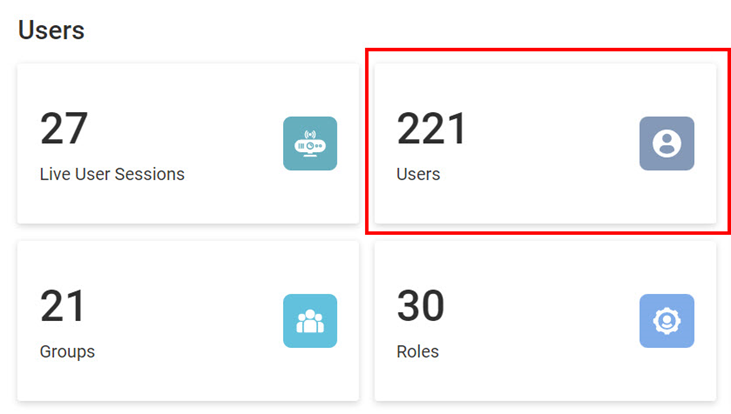

You can see a User Sessions chart on each of the above tabs, as shown below.
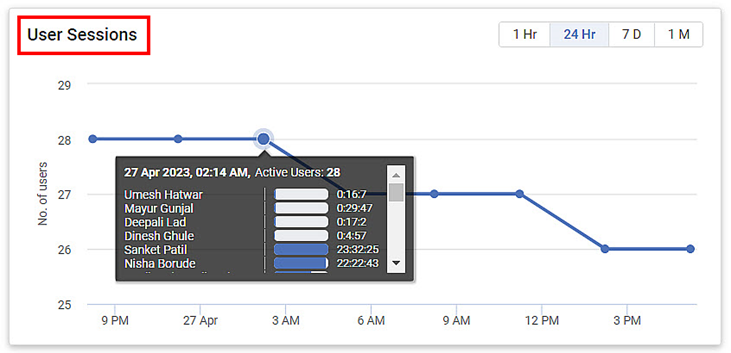


Indicators:

  • Line graph for the number of users active or live at any time.
  • The frequency is set to 24Hr by default. You can change the frequency to 1Hr, 7 days, and 1 month as required.
  • Hover over any time spot to view a tooltip that displays the live user details.


    • Related Articles

    • Managing Users

      You can view your Tenant's users, groups, and roles in the User space. The four clickable KPI Cards for Live User Sessions, Users, Groups, and Roles take you to the respective tabs on the User Page. You can see a User Sessions chart on each of the ...
    • Recently Opened Dashboards

      The Recently Opened Dashboards section in the RubiSight Mobile App allows users to quickly reopen dashboards they accessed earlier. This improves navigation efficiency and helps users resume their analysis seamlessly. 1. Accessing Recently Opened ...
    • Publishing a Dasboard

      You can publish a Dashboard after it is created. Publishing a Dashboard generates a public link for the Dashboard, which can then be shared with the business users. Publishing a Dashboard facilitates business users to Receive the URL and open the ...
    • Groups

      Group consists of several users who perform dedicated tasks while working on a project. Any task allocated to a group applies to all its users. The image below shows the contents below the Groups tab. The following table explains various fields on ...
    • Roles

      Role is the function assumed and responsibility carried by a user. Initially, when users are assigned to a group, they are identified in a new role. A user can perform multiple roles in a project. The role title and its affiliated responsibilities ...