Searching a Dataset
You can search for a dataset by its name. It is especially helpful when the dataset list is long.
| Make sure you are in the correct Workspace, which includes the Dataset that you want to search. |
To search a dataset, follow the steps given below.
Open the workspace that includes your dataset. Refer to Changing Workspace.
On the home page, click Datasets.
Recent Datasets for the selected workspace are displayed.Type the dataset name in the Search field.
As you start typing, the list of dataset names matching the search string is populated as shown in the figure below.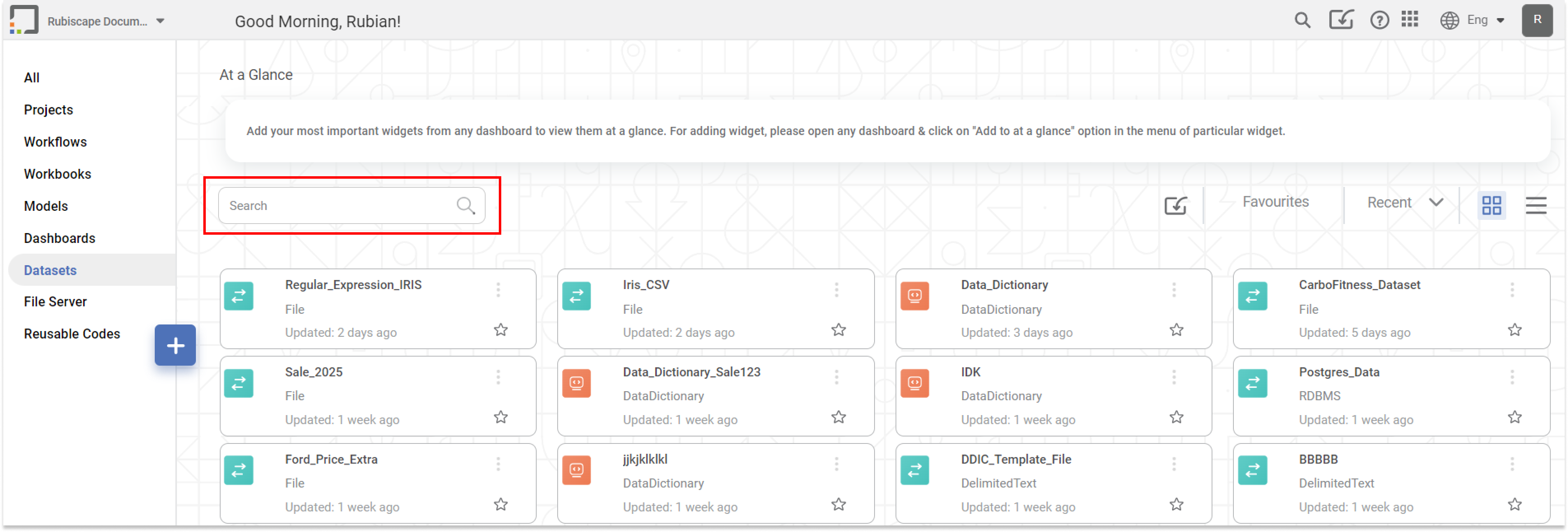
Note:Hover over a dataset and click the ellipsis (
 ) to Edit, Export, or Delete the dataset.
Related Articles
Searching a Location
Searching a location from a long list can be time-consuming. The Search field helps to search your desired location quickly. To search for a location, In the Manage dropdown, click Locations. Type the name of the location you want to search. Partial ...Searching a Template
Searching for a template from a long list can be time-consuming. The Search field helps to search your desired template quickly. To search for a data template, In the Manage dropdown, click Data Templates. Type the name of the template you want to ...Searching a Dashboard
Searching helps you to search a dashboard by a specific name. There can be a long list of dashboards in some workspaces. It is not convenient to manually search a single dashboard from a long list. Note: Make sure you are in the correct Workspace, ...Editing a Dataset
After you add or import a dataset, you can edit it. For adding or importing a dataset, refer to Adding a Dataset or Importing a Dataset. In Editing Dataset, you can, Edit the name and description of the dataset Select, remove, or modify the features ...Adding a Dataset
A dataset is global and shared across the same workspace. Consider adding a dataset before creating a project. You can add a dataset from the supported data sources. The added datasets can be used in multiple projects. To add a dataset, follow the ...